
How to create an online store
Learn how to create an online store step by step using WordPress, PrestaShop, Shopify, or Wix.
Creating an online store has become essential for businesses looking to expand their reach and increase sales in the digital marketplace.
This guide will walk you through the process of building an online store using four popular platforms: WordPress, PrestaShop, Shopify, and Wix.
Explore the advantages of each platform and choose the best solution for your business.
- 1 - Why Create an Online Store?
- 2 - Choosing the Best Platform for Your Online Store
- 3 - Detailed Comparison of Platforms
- 3.1 - WordPress with WooCommerce
- 3.2 - PrestaShop
- 3.3 - Shopify
- 3.4 - Wix
- 4 - Tips for Ecommerce Success
- 4.1 - SEO Strategies
- 4.2 - Digital Marketing
- 4.3 - Mobile Optimization
- 4.4 - Monitoring and Analysis

How to create an online store
1 - Why Create an Online Store?
Building an online store offers several benefits, including:
24/7 Accessibility: Customers can shop anytime.
Global Reach: Sell to customers across different geographical locations.
Reduced Operational Costs: Save on expenses like physical store rentals.
Scalability: Expand your business with ease
However, there are challenges, such as intense competition and the need for an effective digital marketing strategy. This guide will help you overcome these obstacles.

How to create an online store
2 - Choosing the Best Platform for Your Online Store
Selecting the right platform is critical for your store's success. Here are some factors to consider:
Type of product or service you plan to sell.
Budget for setup and maintenance.
Ease of use, especially if you lack technical expertise.
Features required, such as payment gateways and SEO tools.
Ideal for: Designers and developers prioritizing speed.

How to create an online store
3 - Detailed Comparison of Platforms
3.1 - WordPress with WooCommerce
What it is:
WordPress is a popular CMS (Content Management System), and WooCommerce is a plugin that transforms WordPress into a complete ecommerce solution.
Key Features:
Full customization with themes and plugins.
Advanced SEO capabilities for better search visibility.
Large support community.
Pros:
Complete control over design and functionality.
Low initial costs.
Cons:
Requires technical knowledge for setup and maintenance.
How to Get Started:
1 - Install WordPress on a server.
2 - Install the WooCommerce plugin.
3 - Choose a compatible theme and add products.

How to create an online store
3.2 - PrestaShop
What it is:
An open-source ecommerce platform tailored for small to medium-sized stores.
Key Features:
Detailed catalog and inventory management.
Support for multiple languages and currencies.
Scalable for growing businesses.
Pros:
Robust features without licensing costs.
High level of customization.
Cons:
Can be complex for beginners.
How to Get Started:
1 - Download and install PrestaShop on a server.
2 - Configure basic settings like language and currency.
3 - Customize the theme and add necessary extensions.

How to create an online store
3.3 - Shopify
What it is:
A hosted solution that provides tools to quickly and easily create online stores.
Key Features:
User-friendly and intuitive interface.
24/7 customer support.
Easy integration with dropshipping and social media.
Pros:
No technical skills required.
Fast setup time.
Cons:
Higher monthly costs.
Less control over customization.
How to Get Started:
1 - Create an account on Shopify’s website.
2 - Select a theme and customize it.
3 - Set up payment methods and add products.
How to create an online store
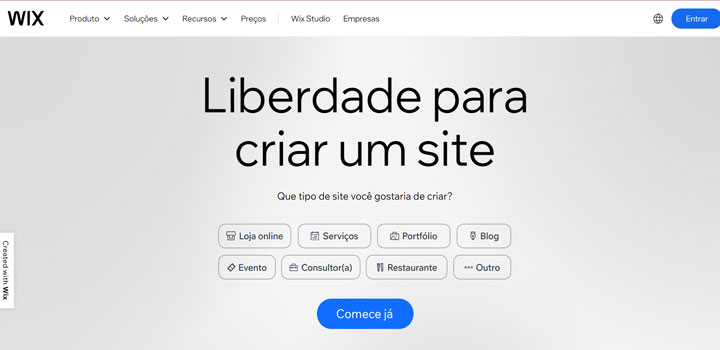
3.4 - Wix
What it is:
A website builder platform with integrated ecommerce tools.
Key Features:
Drag-and-drop editor for easy customization.
Modern templates for online stores.
Built-in marketing tools.
Pros:
Simple and easy to use.
Ideal for small businesses and beginners.
Cons:
Limited scalability for larger stores.
How to Get Started:
1 - Create an account on Wix.
2 - Select an ecommerce template.
3 - Add a store feature and set up payment methods.

How to create an online store
4 - Tips for Ecommerce Success
4.1 - SEO Strategies
Use relevant keywords in titles, descriptions, and store content.
BCreate SEO-friendly URLs and optimize images.

How to create an online store
4.1 - Digital Marketing
Leverage social media to promote products.
Invest in email marketing campaigns.
Experiment with paid ads on Google and social platforms.

How to create an online store
4.2 - Mobile Optimization
Ensure your store is responsive and offers a seamless experience on smartphones and tablets.

How to create an online store
4.3 - Monitoring and Analysis
Use tools like Google Analytics to track your store’s performance.
Adjust strategies based on real data.
Creating an online store may seem challenging, but with the right tools, the process becomes straightforward and efficient. Choose the platform that best fits your needs, follow best practices, and start building your successful digital business today.